Find outdated Mac apps.
Update them together.
Floodtide checks the apps on your Mac and updates supported apps in one place. See what needs attention, choose what to install, and keep a backup you can restore.
macOS 13+ · Intel & Apple Silicon · English and German · No card or account needed
Scanning stays free after the trial. Buying unlocks installing and includes all 1.x updates. Other plans and the 14-day refund.
“It replaced MacUpdater and Latest for me immediately. This is the updater we have been waiting for.”
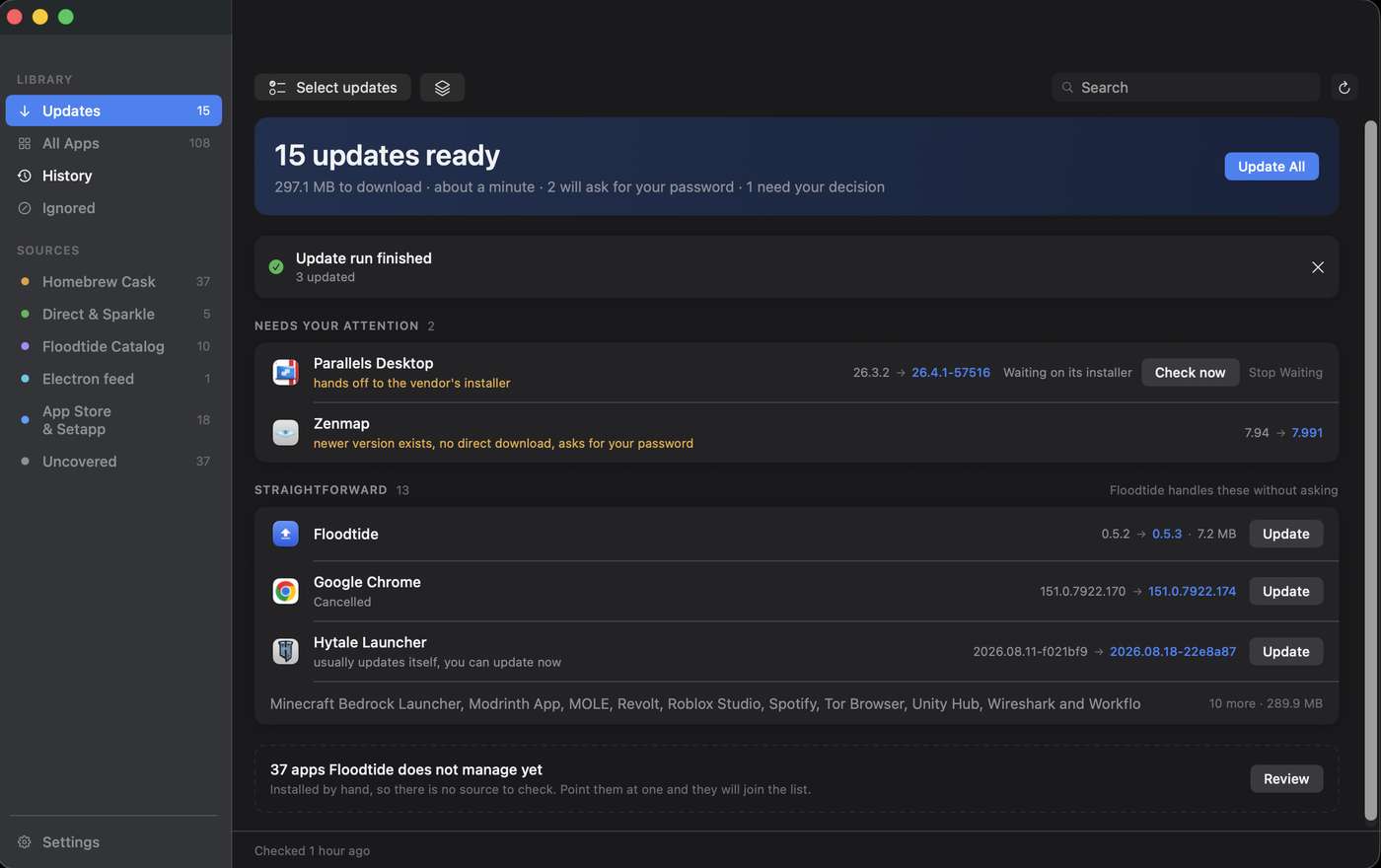
See Floodtide in action.
From scan to finished updates.
Watch the 22-second demo: find updates, choose Update All, and see the results. Sound is optional.
No card or account. Check your own apps before you buy.
Or never open it at all.
Let it run without you.
Everything above is the hands-on version. Turn it around and Floodtide checks on a schedule, keeps a count in the menu bar, tells you once a week, and installs what you have allowed it to install while you are doing something else.
A check every day, or every week
Floodtide checks on its own and keeps a count in the menu bar, so the answer to “is this Mac up to date” is on screen without opening anything. Daily is the default.
Installs while you are elsewhere
Install app updates automatically runs the same safety checks a manual Update All runs, nothing shortened. An app that is open updates as soon as you quit it; Floodtide never closes one for you. Updates only an administrator can install are left for you. Floodtide's own updates have a separate switch, so updating the updater is always your decision.
One notification, not one an hour
Choose a notice after every check, or a single weekly one on a day you pick that lists everything waiting and carries the same Update All button. Checks still run on the interval either way, and the badge still counts.
Quiet hours
Between the two hours you set, Floodtide checks as usual and the badge still updates, but it posts no notification and starts no update by itself. Set it to your working day, or to the night.
One app out, the rest in
Every app has its own Update automatically switch in the inspector. Switched off, the scheduled run leaves that app alone, its update stays on the list, and Update All still takes it when you press it yourself. A separate switch, on by default, decides whether major versions, 4.2 to 5.0, ride along in Update All at all; some developers charge for those, Floodtide cannot know which, and it never guesses.
Somewhere of your choosing, for as long as you want
The copy an update replaces is kept for three days, a week, two weeks or a month, in a folder you pick, on another disk if you like. You can also keep the disk image or package each update was installed from, named after the app and version, and Floodtide never deletes anything from that folder.
Automatic installing is off until you switch it on, and it never asks for your administrator password on an empty screen: an app that would need one is left for you, and the run says so.
Will it update your apps?
Check before you download.
Search 4,746 covered apps. An app missing from this website list may still have its own update feed. The free trial checks the apps installed on your Mac.
4,746 covered apps · list updated 2026-09-24
What Floodtide asks of your Mac.
All of it.
Seven things it could ask for. Six it never does.
Bought it, kept it.
What people say.
Public comments from testers and buyers, trimmed for length, never for meaning.
It replaced MacUpdater and Latest for me immediately. I am very happy! This is the updater we have been waiting for.
One thing I love about it even more than MacUpdater is (when the helper is installed) it really is a 1-click update. No multiple “next next next, enter root password, next next” time wasting.
Finding app updates quickly and conveniently, and installing them automatically. Everything working smoothly, no glitches so far. This is the updater app I’ll be relying on from now on. I’ve already removed Latest and WailBrew from my Mac.
Really love it and it already replaced the app Latest for me. The interface is straightforward and self-explanatory. You can ignore updates for specific apps or skip only the most recent update of an app. The developer was always quick to reply. An amazing piece of software that does exactly what it’s supposed to do and is reasonably priced, especially considering the competition.
I’ve been testing quite a few update apps for over a month. Newcomer FloodTide quickly has become my update app of choice. It belongs to the few apps that finds the most updates. It is also extremely speedy. At £11 one time for 3 Macs, it’s nicely priced. Recommended.
It successfully detected and collected all my installed Mac apps and provides a nice overview in one place. The update process is smooth and the overall experience feels polished and reliable.
Wow, this one works REALLY well! Clean and straightforward look and functionality. Great work!
Awesome application. I’ve been using since you started. Purchased the license a few days ago.
Great app!
Buy it once.
Then stop thinking about it.
Keep scanning for free. Buy once to keep installing updates on up to 3 Macs. Every 1.x update is included. If a 2.0 ever ships as a paid upgrade, owners get it at half price, and the version you own keeps working either way.
PAID ONCE · YOURS TO KEEP
- Every update source, unlimited apps
- One-click Update All with automatic backups and undo
- 14-day full trial before any money moves
- After the trial the scanner stays free, only installing locks
- All 1.x updates included; 2.0 will be half price for owners
- Built and answered by one person, not a portfolio company
- Not for you? Email within 14 days and the payment comes back
Not sure yet? Run the free 14-day trial. No card, no account.
Card handled by Stripe. Key delivered instantly on the success page. Lost yours?
Undo Last Update
Enable backups to keep the old version as a disk clone or archive, choose how long to retain it, and restore a retained backup in one click.
Same developer, verified
Every downloaded bundle's code signature and Gatekeeper verdict are checked before it replaces anything, and the new build must carry the same Apple developer team as the app already installed. A hijacked download feed cannot swap a signed app for an impostor; a genuine identity change asks you first, and a build signed worse than the one you had is refused.
3 Macs, one key
A license covers 3 Macs. The key arrives by email the moment the payment clears.
brew install --cask realm9758/floodtide/floodtideHow Floodtide finds updates.
Read from the sources.
MacUpdater maintained exact version information for more than 100,000 apps and direct updates for thousands until that daily workload became unsustainable. Floodtide asks the sources that already know.
The app's own feed
Most indie Mac apps publish a Sparkle feed. Floodtide reads the URL from the app bundle itself and checks the developer's appcast directly. Authoritative, signed, current the second a release ships.
Homebrew casks, and formulae too
A community-maintained index of Mac software. Floodtide reads the cask catalog directly, so Homebrew does not need to be installed, and safely matches 3,256 installable app bundles against it, pulling each vendor's official download and checking it against Homebrew's checksum, or, where a vendor publishes none, against the developer signature already on the installed copy. If you do run Homebrew, a pane of its own lists every cask, formula and tap it has installed and upgrades them through brew itself.
It can also hand Homebrew the apps you installed by hand. An app Homebrew packages but did not install offers to be adopted: Homebrew records the copy already on your disk as its own and updates it from then on. Nothing is moved, replaced or downloaded again. There is an Adopt section listing every app this applies to, with Adopt All, so a Mac with years of hand-installed apps can be brought under Homebrew in one pass.
GitHub Releases and Electron feeds
Plenty of apps publish neither an appcast nor a cask, but do ship releases on GitHub or an Electron update feed. Floodtide reads both, picks one unambiguous Mac build rather than guessing between several, verifies the SHA-512 an Electron feed publishes, and keeps the developer identity check in force either way.
Floodtide's own catalog, and yours
A small signed feed covers apps nothing else can match on its own. It only ever names which source to read, so the reading still goes back through the sources above and nothing about verification is duplicated. You can also point any app at a Sparkle URL or a GitHub repository yourself, and your choice is checked before anything Floodtide discovers.
The Mac App Store, in place
Store apps update inside Floodtide: the row ends on the new version like any other, no App Store window opens and no password is asked for. Floodtide carries its own signed and notarised copy of the tool that talks to the store and runs it as you, not as an administrator. It reads what the store is offering on this Mac rather than Apple's public listing, which is why an iPhone or iPad app on Apple silicon no longer reads as outdated for weeks. An app over about 675 MB, an iPhone or iPad app, and an account you are signed out of still go to the store, and the row says which it is.
Named owners, and an honest uncovered list
Apps Setapp or Microsoft AutoUpdate keep for themselves are labelled as theirs, with the pending version shown beside them instead of touched. If no source can prove a safe update, Floodtide says uncovered rather than guessing. One click can send an anonymous coverage request, and the exact payload is visible before sharing is enabled.
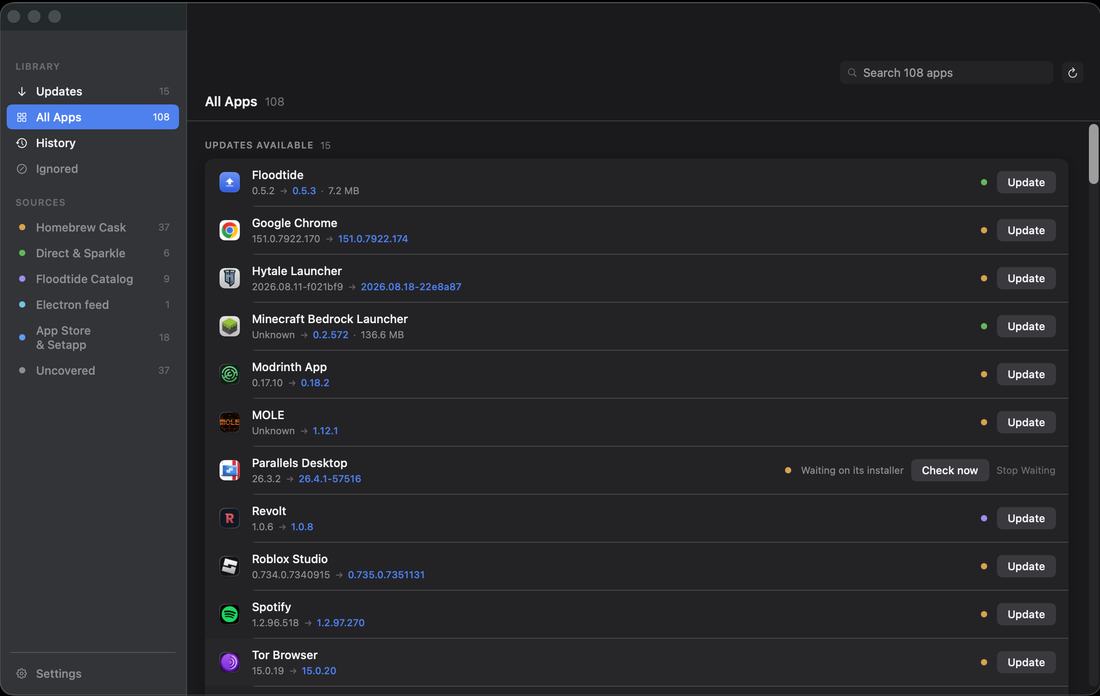
The updates it will not hand you.
On purpose.
An updater that offers everything it finds is easy to write and hard to trust. These are the cases Floodtide holds back, each one found on a real Mac and named in the row rather than hidden.
An unattended run is stricter again. It also leaves Floodtide itself, any app that would need your administrator password, any app that needs the vendor's own installer, any release an earlier run already proved cannot be installed, and any app you switched off. It never answers a question on your behalf.
The field,
honestly drawn.
Capabilities checked against each product's own site in August 2026.
| Updater | Price | Update sources | Posture |
|---|---|---|---|
| Floodtide | £10.99 once, 3 Macs | Sparkle, Homebrew casks, GitHub Releases, Electron feeds, the Mac App Store and a signed catalog, plus manual sources you set; no Homebrew install needed, and Homebrew formulae and taps too when it is | macOS 13+; no telemetry about you or your apps, explains every prompt, verified backup and undo |
| Updatest | See vendor | Homebrew, App Store, Sparkle, Electron, GitHub | macOS 15+; Homebrew recommended for full detection |
| Latest | Free | Sparkle + App Store | Open source; focused on the two sources it supports |
| Version Tracker | €49.90 once for 1 Mac, or €19.90 a year | 48 sources, including Homebrew, App Store, Sparkle, npm and pip | macOS 15+; the free tier scans but does not update |
| CleanMyMac | Subscription or one-time purchase | Own database | Updater is a side feature of a large suite |
| MacUpdater | Discontinued | Own hand-fed database | Sales and support ended 1 January 2026; CoreCode says the database server stays up until 31 December 2026 |
Questions
from the pier.
Is this a subscription?
No. £10.99 buys the app outright, with every 1.x update included, and nothing renews. If a 2.0 ever ships as a paid upgrade, owners get it at half price. Buying for a business with more than ten Macs? Email raf@bhopstudio.com.
Why should I trust one person with my Applications folder?
You should not have to take it on faith. Floodtide is signed with a Developer ID and notarised by Apple, and it holds every update to the same bar: each downloaded bundle’s code signature is verified, and the new build must be signed by the same Apple developer team as the copy it replaces, so a compromised download feed cannot swap a signed app for an impostor. When backups are enabled, it also keeps the version it replaced for your chosen retention period, and rolls back automatically if a build is signed worse than the one you had.
What happens when my trial ends?
Floodtide keeps scanning and showing you what is outdated, free, forever. The Update buttons lock until a license is entered. Nothing nags on a timer.
What if it is not for me after I have paid?
Email raf@bhopstudio.com within 14 days of buying and the payment goes back through Stripe. The trial exists so that this rarely needs to happen.
Can I install it with Homebrew?
Yes. brew install --cask realm9758/floodtide/floodtide installs the same signed disk image from Floodtide’s own tap, and the app updates itself afterwards.
Which update sources does it check?
Six, live, per app: the app’s own Sparkle appcast, the Homebrew cask catalog, GitHub Releases, Electron update feeds, Floodtide’s own signed catalog, and the Mac App Store. You can also point an app at a Sparkle URL or GitHub repository yourself, which is a choice about which of those to read rather than a seventh source. The app’s own feed wins outright, and an app Homebrew installed stays Homebrew’s to update. Apps Setapp or Microsoft AutoUpdate manage are named as theirs rather than touched. If Homebrew is installed, a separate pane also covers its formulae and taps, upgraded through brew itself.
Does it update Mac App Store apps?
Yes, in place, since 1.3.0. Press Update on a store row and the app updates where it stands: no App Store window opens, no password is asked for, and Update All includes those apps alongside everything else. Floodtide carries its own copy of the tool that talks to the store, signed and notarised with the app, and runs it as you rather than as an administrator, which is why nothing is asked of you. It needs the Floodtide installer set up once, from Settings, and the row says so when it is not. Three cases still go to the App Store, and the row says which: an app whose download is larger than about 675 MB, such as Xcode or the Microsoft Office apps, because an update running for hours inside Floodtide would tell you less than the store does; an iPhone or iPad app running on an Apple silicon Mac, which only the store can update; and an app you are signed out for or bought under a different Apple Account.
What if an update breaks something?
When backups are enabled, Floodtide keeps the previous version as a disk clone or archive for your chosen retention period. Undo Last Update restores a retained backup in one click. Floodtide also verifies each new bundle’s code signature before calling the job done, and a build signed worse than the one you had is refused and rolled back automatically.
Why does it sometimes ask for my password?
Some apps live in folders macOS protects. Replacing those needs the same administrator prompt any installer shows. By default Floodtide batches the whole run into one prompt; with Update one app at a time switched on and without Floodtide’s installer, each app asks in turn. It tells you before a prompt appears and never sees the password itself; macOS handles it.
Is my data involved at all?
The app makes network requests to check updates and validate your license. Coverage data (app name, version, covered or not) is shared only when you make a one-time request or enable optional background reporting; Settings shows the exact payload first.
The tide comes in tonight.
Run it free for 14 days. £10.99 once if you keep it, yours from then on. Your app inventory stays on your Mac unless you choose to share it.
1.3.12 · 31.3 MB · macOS 13+ · Intel & Apple Silicon